
Do you own a Debenu Quick PDF Library version 7, 8, 9, 10, 11, 12, 13 or iSEDQuickPDF license? Upgrade to Debenu Quick PDF Library 14 today!
|
PrintDocument prints strange characters |
Post Reply 
|
| Author | |
that0th3rGuy 
Beginner 

Joined: 01 Sep 10 Location: South Africa Status: Offline Points: 6 |
 Post Options Post Options
 Thanks(0) Thanks(0)
 Quote Reply Quote Reply
 Topic: PrintDocument prints strange characters Topic: PrintDocument prints strange charactersPosted: 20 Jan 12 at 12:17PM |
|
Good day,
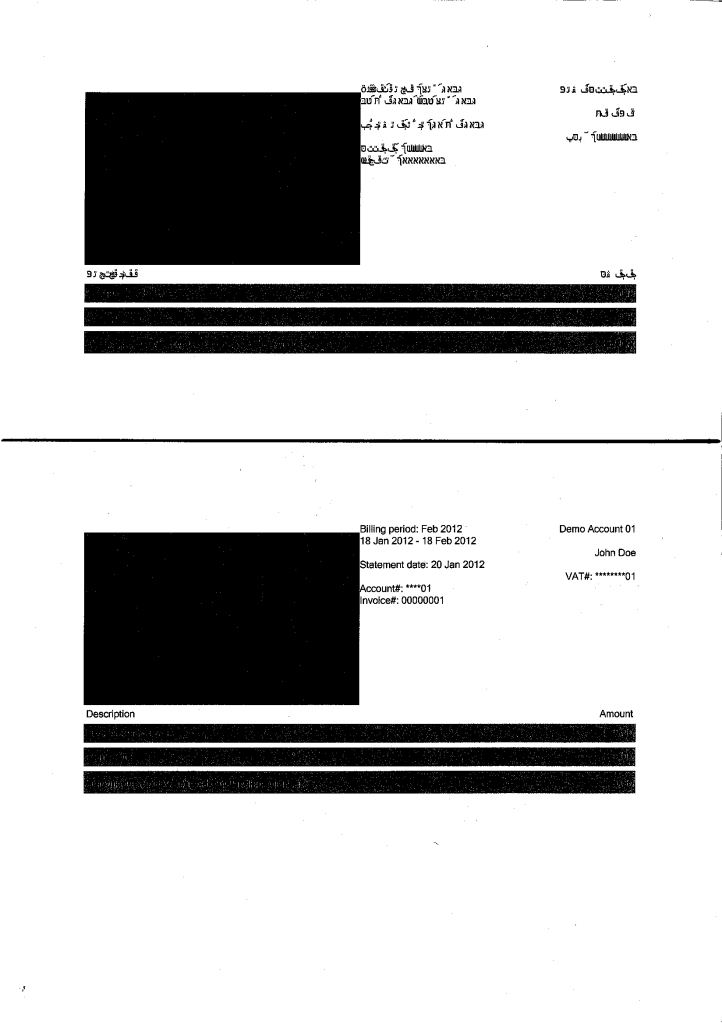
QuickPDF version 7.26 Platform Windows Forms Environment Visual Studio 2010 I am using QuickPDF to generate some documents and store them in a database. From there they can be viewed and printed. When viewing the saved document, the byte[] is read from the database, a temporary file is created and the temporary file is opened in Adobe Acrobat; this file looks as expected. Printing from here also produces a document looking as expected. This tells me that generating the document with QuickPDF works. However, using QuickPDF's methods to print the stored documents yield some odd results (refer to attached image below):
When inspecting the contents of the PDF documents - both the direct and QuickPDF ones - with a text editor one can clearly see the difference. The one created by QuickPDF's PrintDocumentToFile() method contains a bunch of intelligible gibberish whereas the direct one has a readable and very evident structure - as I understand, a PDF viewed as text should look. I also stepped the code and inspected the byte[] converted to string and it looked correct - same as the temporary file. This tells me that something goes wrong when QuickPDF is communicating with a printer - both Adobe PDF printer and the physical printers yielded the same seemingly corrupted document. I opened the printer's settings to try and see if i could solve the problem but to no avail. Thank you in advance to everyone taking the time to consider my situation. Any and all comments are greatly appreciated. Kind regards, Hannes. ******** This is a scanned image of the printed documents:
 |
|
 |
|
|
AndrewC
Moderator Group 

Joined: 08 Dec 10 Location: Geelong, Aust Status: Offline Points: 841 |
Post Options
Thanks(0)
Quote Reply
Posted: 24 Jan 12 at 12:40AM |
|
Can you please send the PDF document to the QPL Support via http://www.quickpdflibrary.com/support/support-query.php
The problem seems to be font related but I won't know until I see the document.
Your document will be treated as confidential. Andrew. |
|
|
|
|
that0th3rGuy
Beginner
Joined: 01 Sep 10 Location: South Africa Status: Offline Points: 6 |
Post Options
Thanks(0)
Quote Reply
Posted: 24 Jan 12 at 6:29AM |
|
Good day,
Thank you for taking the time to consider my question and responding to it. I submitted the files you requested and the case number for this query is 10200. I said this in the email as well, but just to be safe: test.pdf This file is the one created by printing via QuickPDF's PrintDocumentToFile() method. tmpE69A.pdf This file is the one created by fetching the byte[] from the database and writing it to disk.
Thank you for your time and assistance. Kind regards, Hannes. **EDIT: Got the two files mixed up; corrected.
Edited by that0th3rGuy - 24 Jan 12 at 9:03AM |
|
|
|
|
AndrewC
Moderator Group
Joined: 08 Dec 10 Location: Geelong, Aust Status: Offline Points: 841 |
Post Options
Thanks(0)
Quote Reply
Posted: 24 Jan 12 at 1:54PM |
|
This problem has been fixed in the 8.13 release of Quick PDF Library.
|
|
|
|
|
Post Reply
|
|
 Tweet
Tweet
|
| Forum Jump | Forum Permissions You cannot post new topics in this forum You cannot reply to topics in this forum You cannot delete your posts in this forum You cannot edit your posts in this forum You cannot create polls in this forum You cannot vote in polls in this forum |
Copyright © 2017 Debenu. Debenu Quick PDF Library is a PDF SDK. All rights reserved. About — Contact — Blog — Support — Online Store


 Topic Options